8/03/2013

Icons

I presume most of you know him, I refer to Philippe Boukobza and his fantastic blog Co-Nectar. Philippe is a rerefence in the mind mapping world and he is also a friend of mine. That's one reason for being lucky!

In his latest post he talks a little bit about different applications to draw. Fifty-three's Paper (we have already talked about this fantastic application in the blog) and Tayasui Sketches, another awesome application for drawing in the tablet world. But thr most important topic he talks is about using these software tools to create your icon's library for your software-made maps. That turns out to be really important to me because it's an open door to transform your software-made mindmaps a little bit more hand-crafted ones.

Using your personal icons (made/drawn by you) customize pretty much your maps and really helps you be much more focused on the topic.


For obvious reasons icons are extremely important parts in a map, because they are really what keep us our right hempisphere really focus in the topic and what sparks our creativity.


8/01/2013

Getting back to the origin

First off, I apologize for not posting regularly in the latest months. I will try to catch up.
If we get back to the origin, the mindmaps come from our brains (the two ones we all have, I refer to our both hemispheres) and how they proccess the information they have got.
I have come across an image, which describes it in the best possible way. That image was published in a very interesting (cartoonaday.com), which I do recommend, it's worth a visit to see right hemispheres working properly.

12/06/2012

Fiftythree´s Paper and MindMapping

In my latest post I talked about a famous applcation named Evernote and how we can approach this application in order to enhance our mindmapping experience. This time I would like to talk a little bit about a fantastic drawing tool (Fiftythree's Paper), it is an awesome application if you like to draw anytime, anywhere. I commonly use it in my iPad to draw everything around. This application can be used also to make handmade mindmaps by using its fantastic drawing capabilities in terms of colors, pen's variety and many possibilities to express yourself in a grafic way. What you can see in this post it is a picture of a mindmap made using Paper. It is contradictory and tricky but it is also a way to make software handmade mindmaps, so we will have to remake our previous mindmapping distintions: handmade and software-made. This distinction makes no sense whatsoever.

11/30/2012

Evernote + MindMapping = Ever...Mapping

Now let's talk a little bit about mixing two different tools with features in common (mindmapping and Evernote). I will confess I'm an avid Evernote user, I used to throw everything I come across into that fantastic tool. I love the combination of massive storage and impressive mechanisms to look for specific information in this large amount of information. On the other hand one of the main features of mindmapping is using the two hemyspheres, among other things, to remind the information for the future. It turns out also important to keep track of your mindmaps in order to see you evolution. So gathering previous statements one can infer that just good things can be obtain by mixing those tools. That combination based on storing your handdrawn mindmaps and your softwaremade ones makes it easier to find maps related to specific tags, contents, words,... The only feature you have to be sure about in case of handmade is to be very straight in the art of writing. One doubt I have got is the difficulty to recognise words in the 6 hour branch in the map, vertical words must be difficult to find. It also important to say that mindmaps must be scanned or export to PDF, where Evernote makes it easier to find content

9/22/2012

Mindmapping legal issues

I must recognize I'm really new to legal issues (trials, courts, judge, deeds, procedures,...).Due to a personal affair with my house's constructor, I was forced to step in this world.Coming from an engineer's mind, I made this map to understand the two deeds about our judicial procedure in our lawsuit.I am also sorry to say it's written in my mother tongue (Spanish) but in order to make it more understandable for not Spanish speakers, every cloud defines: who pays the costs of the procedure, which points I have in favour, which ones I have against and the players responsible for the facts in the deed.

4/10/2012

Financial Information


One of my todo tasks for this Easter holidays was to develop an Excel macro, in order to retrieve financial information (my portfolio, stock markets evolutions, currencies exchange, commodities market evolutions, market movers in different stock markets...) for many different external sources to make it available to myself with just one click away on daily basis.
In the process to do that I mindmapped to analyze the different webpages and the most important financial information in every one of them.

2/11/2012

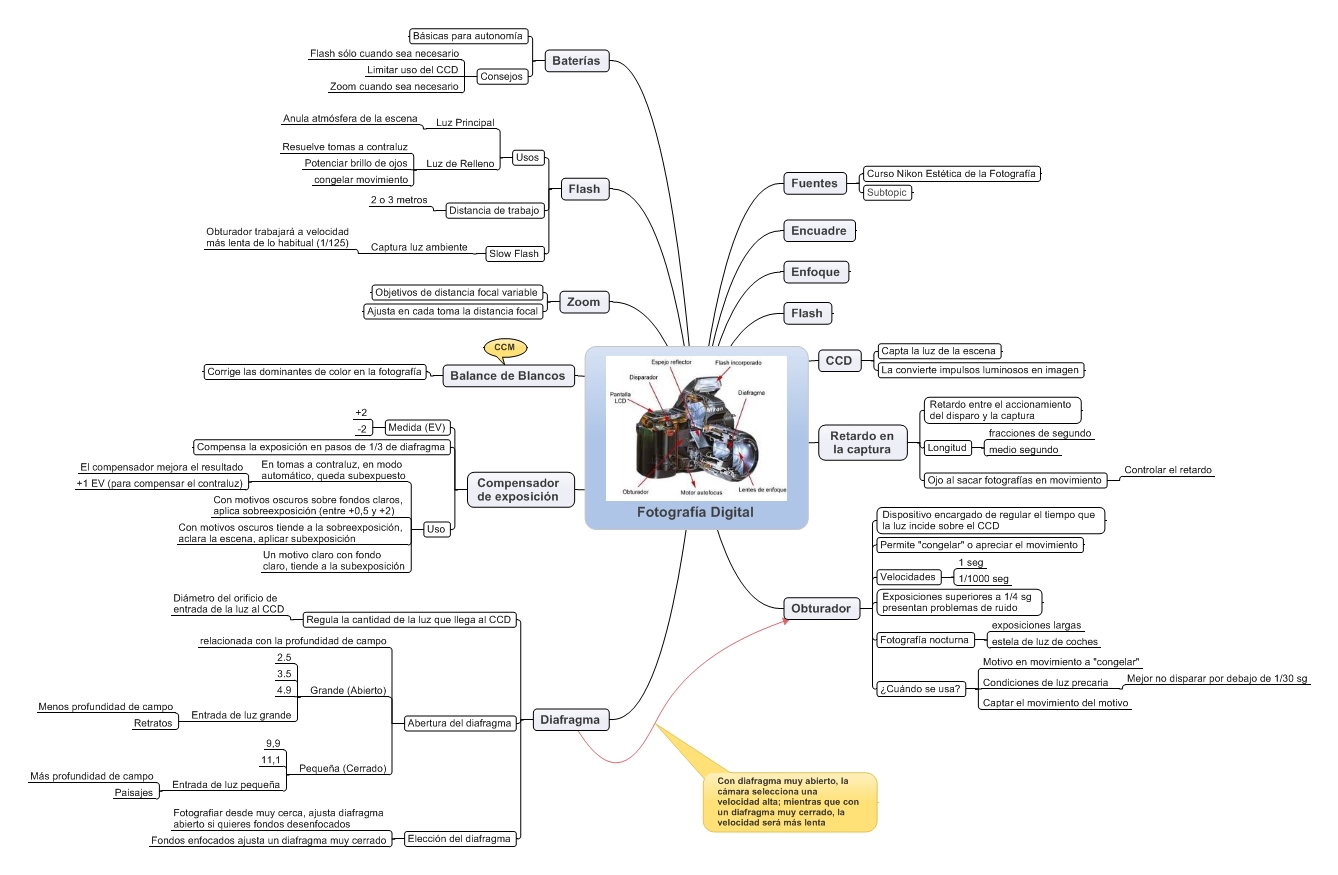
Early steps with Digital Phtography


Some time ago I was lured by Digital Photography. There are some different concepts you need to deal with, if you want to understand what is on the game.
What was the best way to approach that matter those days?
Ja, mindmapping, sure.
One handicap, it was made in Spanish.

2/04/2012

Getting back

After some months without posting due to personal issues, I will retake shortly the posting on new topics related to our preferred matter, mindmapping.

9/16/2011

iPad's MindManager


As most of you are aware of, iPad has turned out to be a universally wide deployed mobile device, also its applications are commonly used these days. We have talked a little bit about mindmapping on iPad by using iThoughtsHD. This time I'll take about the Mindjet's MindManager version for iPad. It's simple, cute, easy-to-use, efficient, multiplatform (iPad and iPhone).
If you are used to work with MindManager on your desktop or laptop, this is an application, you should give it a try!
Branches creation turns out very simple, you just tap and hold, and define the direction where the branch should go and it's done!
It also has Dropbox integration, WiFi transfer and also most part of all visualization fearures already existing in other MindManager versions.
In the coming days I am going to give it a deeper try and I´ll show you the results.

9/09/2011

Novamind 5´s interesting layout feature

I guess most of you know or even have used Novamind, it is a very interesting and useful mindmapping software.
In this particular entry, I'll talk a little bit about an innovative solution for a common problem, whenever you use a mindmapping software...the huge amount of empty and unuseful spaces in large maps.
In the following Youtube video, it is explained by Gideon King, how Novamind 5 tackles this particular issue, which I would say it is extremely good.

9/07/2011

iPad's Discovr Apps


Surfing different webpages and the Apple Store, I came across a very funny and useful application. It's called Discovr AppStore.
Here you see a snapshot.
Is its look familiar to you? ---)))

8/25/2011

MindMapping for grammar learning


During this vacation season I have gone over my old german grammar lessons to polish it up.
Of course I have taken advantage of mindmapping in this revision --)))
Advantages from my point of view:
1.- More deeper analysis when you are making the map
2.- Easy to review, easy to remember.

7/23/2011

MindMapping and "The Five Habits of highly Innovative Leaders"


I apologize for these months without posting. Important things are happening in my professional and personal life and they´re taking all the time I've got.
Today I come across a very interesting article in Forbes.com´s blog. It is an article about habits in very highly innovative leaders.
If you take a look at the article and you focus on the fifth, you´ll see the importance given in the article to the Associatonal Thinking, describing the need for drawing connections among different concepts, ideas from unrelated fields and sources.
This is the point where mindmapping techniques show up with and suitable and extraordinary methodology to speed up this fifth habit capabilities.
Have you ever taken a chance on a mind map and haven´t you found different and weird ideas popping up about one particular topic?
If so, perhaps you´re on the way to be a Highly Innovative Leader.

4/22/2011

5 iMindMap5 copies to give away


Courtesy of ThinkBuzan Ltd, we have the opportunity to give away 5 iMindMap5 copies to our esteemed readers.

If you want to get one of these, please send a hand-made mindmap to me(it has to be fresh new and unreleased) about a very important topic (the Spring season).

We will go into the different maps, selecting the best ones to get the award.

4/19/2011

Hands on DropMind


I want to take this opportunity to talk a little bit about a software I am using lately (DropMind).

First off I want to thank Dropmind people and specially to Emel Karakash for passing me the testing code.

As stated in his webpage, it is a less expensive (from 5 to 10 times) alternative to MindManager.

DropMind is an intuitive, multiplatform and user-friendly mindmapping application which offers:

- Integration with MS Office, Google Aps, MS Projects and others
- It allows and works comfortably in several different platforms (desktop, mobile, iPad)
- It also provides a DropMind web account, so you can upload your maps and make them available everywhere you go, as far as sharing your maps with partners, colleagues and friends.

Testing it in my iPad I must say it is really simple but complete, easy enough to be used and to make your maps quickly available on the web (in my opinion, in the Apple iPad environment simplicity is a must).

Summing up I must say it is a really cool application, easy to use, with many possibilities and cheaper in comparison with other applications existing on the market.

DropMind is a really good alternative either if you are thinking about stepping in mindmapping world or if you are a daily user.

4/05/2011

Visualizing connections in linkedin.com


Thinking a little bit outside mindmapping but within visualization world, I have found the following application, which by using the powerful linkedin.com tool, takes it a little bit further, showing visually the connections among the different contacts to different levels of interrelation.
Really cool and powerful application.
Coming from my own contact, visualizes the connections and interrelations among them by means of lines and dots, if you press any of them, you can see data of this particular contact and his/her shared connections with you.
If you want to have access to this particular tool, you can get yours throught this link in the right corner downwards.

3/13/2011

iMindMap 5


Thanks to Tony Buzan Ltd, I have just received recently a beta test version of iMindMap 5. After testing it for some days, I would say is an amazing software to walk on the mindmapping software world.
Talking about new features in this particular version (some major enhancements comparing with iMindMap 4 version):
- 3D view and presentation posibilities (Awesome!!!)
A better and superb improvement in terms of visualization and really cool to test it and to use it.
- Easiness for filtering possibilities.
All of us who really use mindmapping software in the daily work with our heavily loaded maps, we know for sure the usefulness of the filtering possibilities.
In this particular case these filtering possibilities are really improved.
- Enhanced for online storage and collaboration
That is a key in today´s outlook in terms of mindmapping software and it turns out to be mastered in this new release.
Summing up a new version of this widely spread software, with much more possibilities, taking mindmapping software to a further step.

3/05/2011

Biggerplate


Mindmaps repositories are a very good tool to get fresh and different ideas about mindmapping styles. In this particular world Biggerplate turns out to be a really fantastic tool to analyze deeply.
This kind of repositories are useful either if you use mindmapping constantly in your normal life or if you are a rookie.
Thanks to Liam Hughes I have been checking the repository out and I have seen the easiness you upload your maps, the possibility to explore the map you pick with the MindManager viewer and the Miniprofiles if you want to popularize your profile or your site in social networks.
Summing up an extraordinary tool to work with.

2/27/2011

iThoughtsHD for iPad


I must confess I am iPadict --)))
The very first application I bought after getting the iPad was iThoughtsHD.
The first thing I missed was getting some mindmapping application on the ipad, taking advantage of the tactile features and the really fast ability to draw mindmaps on th fly. That was just something like mixing up tha advantages of hand-made maps and software-made.
It makes my life easier, drawing mindmaps really fast and sending it out through email, so you can get you iPad-drawn mindmaps wotking with the desktop mindmapping applications.
Really cool!

2/11/2011

Taking notes all day long